Talaria mx3 display
Talaria MX3 Display: Your Ultimate Guide to This Essential Electric Bike Feature
If you’re into electric dirt bikes, you’ve probably heard of the Talaria Sting MX3. This powerhouse of a ride combines thrilling performance with eco-friendly electric power, making it a favorite among off-road enthusiasts. But one component that often gets overlooked—yet plays a crucial role in your riding experience—is the Talaria MX3 display. This handlebar-mounted screen serves as your bike’s command center, delivering real-time data to keep you informed and in control. In this comprehensive guide, we’ll dive deep into everything you need to know about the Talaria MX3 display, from its key features to troubleshooting tips and beyond. Whether you’re a new owner or considering an upgrade, stick around to learn how this display can elevate your rides.

What Is the Talaria MX3 Display?
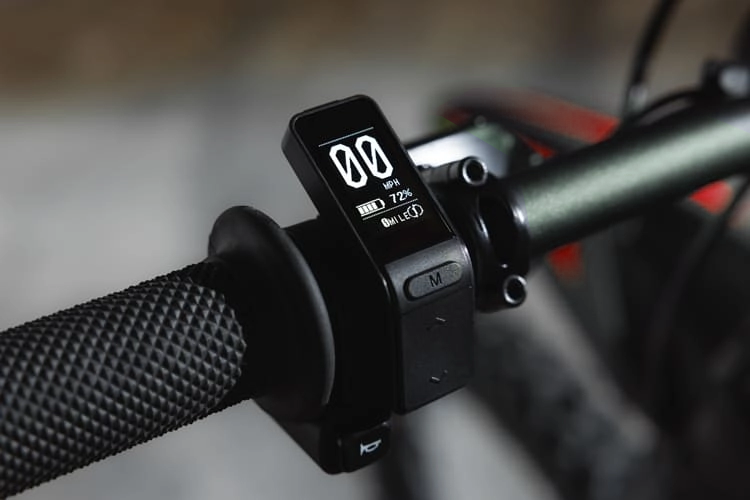
At its core, the Talaria MX3 display is the digital dashboard integrated into the Talaria Sting MX3 electric dirt bike. It’s designed to provide riders with essential information at a glance, ensuring you can focus on the trail ahead rather than fumbling with controls. Manufactured with durability in mind, this display uses high-contrast OLED technology, which offers sharp visuals and low power consumption—perfect for extending your battery life during long adventures.
The display connects seamlessly to the bike’s electronic systems via the controller, pulling data from sensors to show metrics like speed and battery status. It’s mounted right on the handlebars for optimal visibility, and its compact yet readable design makes it suitable for both casual riders and serious off-roaders. Unlike basic speedometers on traditional bikes, the Talaria MX3 display incorporates modern features like error code diagnostics, making it a smart addition to your electric setup.
For those unfamiliar with the Talaria lineup, the MX3 model is positioned as a more approachable option compared to its siblings like the MX4. It’s equipped with a 60V battery system and delivers up to 5.5kW of peak power, achieving speeds over 45 MPH. The display ties into this performance, helping you monitor and optimize your ride without interruptions.
Key Features of the Talaria MX3 Display
The Talaria MX3 display packs a punch with features that enhance safety, efficiency, and enjoyment. Here’s a breakdown of what it offers:
Real-Time Speed Monitoring
One of the standout elements is the real-time speedometer. Whether you’re cruising on flat terrain or tackling steep hills, the display shows your current speed accurately, helping you stay within safe limits and comply with any trail regulations.
Battery Level Indicator
Battery management is critical for electric bikes, and the Talaria MX3 display excels here by showing the remaining charge as a percentage. This feature prevents unexpected power loss, allowing you to plan your routes effectively. It also integrates with regeneration levels, displaying how much energy is being recaptured during braking for a more efficient ride.
Riding Mode Selection
Switching between modes is a breeze. The display lets you toggle between Eco mode for battery conservation and Sport mode for maximum thrill. In Eco, you’ll prioritize range and a smoother pace, while Sport unleashes higher speeds and torque for adrenaline-pumping action. This versatility means you can adapt to different terrains or moods on the fly.
Odometer and Trip Meter
Track your adventures with the built-in odometer, which logs total distance traveled, and the trip meter for session-specific mileage. These tools are great for maintenance scheduling or simply bragging about your epic rides to friends.
Additional Metrics and Error Codes
Beyond the basics, the display can show error codes if something’s amiss, acting as an early warning system. With compatible upgrades, it might even display advanced data like battery voltage, temperature, or energy consumption.
The OLED screen ensures everything is visible even in bright sunlight, with vibrant colors and sharp contrast that don’t drain your battery unnecessarily. Riders appreciate how this setup keeps things simple yet informative.
How to Use the Talaria MX3 Display Effectively
Getting the most out of your Talaria MX3 display starts with understanding its interface. Navigation is handled via buttons located near the display or on the handlebars. A quick press cycles through screens— from the main speed view to the trip meter or mode selector. Before heading out, spend a few minutes familiarizing yourself to avoid distractions mid-ride.
For mode switching, hold the appropriate button until the display confirms the change. Monitor your battery closely during extended trips; if it dips below 20%, consider switching to Eco to stretch your range. The regeneration indicator is particularly useful on downhill sections, as it shows energy being fed back into the battery, potentially adding miles to your journey.
Pro tip: Pair the display with performance upgrades like a new controller. For instance, integrating a Bluetooth-enabled controller can sync data to a mobile app, expanding what you see on the screen to include detailed analytics like average speed or power draw.
Benefits of Upgrading or Maintaining Your Talaria MX3 Display
Why bother with the Talaria MX3 display when basic bikes get by without one? The advantages are clear. First, it boosts safety by keeping you aware of your speed and battery without taking your eyes off the path for long. Second, it motivates you—seeing your mileage rack up can encourage longer explorations or fitness goals.
From an eco perspective, monitoring regeneration promotes sustainable riding habits, reducing your overall energy use. The display’s intuitive design also means less time tinkering and more time enjoying the ride. If your original display feels outdated, consider a larger aftermarket version for even better readability, especially in varying light conditions.
Maintenance is key to longevity. Regularly clean the screen with a soft cloth to avoid scratches, and protect it from extreme weather. This simple care ensures your Talaria MX3 display remains reliable for years.

Installation and Replacement Guide for the Talaria MX3 Display
If your display gets damaged—say, from a rough tumble—replacing it is straightforward. Many retailers offer OEM replacements starting around $90 to $170, depending on the model. The process is DIY-friendly: unplug the old unit, connect the new one via the appropriate connector (white for MX3), and secure it to the handlebars. No special tools are needed, and it typically takes under 30 minutes.
For those eyeing an upgrade to a larger screen, compatibility is crucial. Larger displays often add color and more metrics, but ensure they match your bike’s wiring. Installation videos are abundant online, showing step-by-step guidance to avoid common pitfalls like loose connections.
Troubleshooting Common Issues with the Talaria MX3 Display
Even the best tech can hiccup. If your Talaria MX3 display goes blank, check for loose wires or a blown fuse first—these are common culprits after bumpy rides. Flickering might indicate a power issue, while unresponsive buttons could be due to dirt buildup.
For inaccurate readings, recalibrate sensors or reset the bike by powering it off for a minute. Error codes? Refer to your manual or the display itself for clues, then address the underlying problem, like a sensor fault. If issues persist, consult a dealer, especially if under warranty. Regular inspections can prevent most problems, keeping your display in top shape.
Comparing the Talaria MX3 Display to Other Models
How does the Talaria MX3 display stack up? Against the MX4’s TFT screen, it’s more basic but energy-efficient with its OLED tech—ideal for riders who want reliability over flash. The X3 display is even simpler, focusing on essentials for beginners.
Compared to competitors like the Surron LBX, the MX3 offers a more intuitive interface with better integration for upgrades. Users often praise its clarity over Surron’s, especially in sunlight. If you’re debating models, the MX3 strikes a balance between features and affordability.
User Reviews and Real-World Experiences
Owners rave about the Talaria MX3 display’s durability. In a two-year review, one rider reported zero issues, highlighting its reliability even after upgrades like new wheels and seats. Test drives emphasize how the display enhances the overall ride, making the bike feel more like a high-tech gadget than a simple dirt bike.
Some note that while the standard display is great, a larger version improves visibility in bright conditions. Overall, reviews score it high for value, with few complaints beyond occasional sun washout—easily fixed with an anti-glare screen.
Final Thoughts on the Talaria MX3 Display
The Talaria MX3 display isn’t just a gadget; it’s an essential tool that transforms your electric dirt bike experience. From real-time insights to easy mode switching, it empowers you to ride smarter and safer. If you’re in the market for a Talaria Sting MX3 or looking to replace your display, prioritize quality OEM parts for the best results. With proper care, this display will serve you well on countless adventures. Ready to hit the trails? Your Talaria MX3 display is waiting to guide the way.
